
Sagar Club Login Guide 2026
Logging in to Sagar Club should take ten seconds. This walkthrough covers every device and the handful of things that slow people down.
Sagar Club 2026 · Adults 18+ only · Updated October 2026
Quick answer
Open the official app or site, tap Log in, type your ten-digit number and password, and tap Log in. No OTP is needed unless you’re resetting your password.
On this page
— ANDROID
On Android
The installed app.
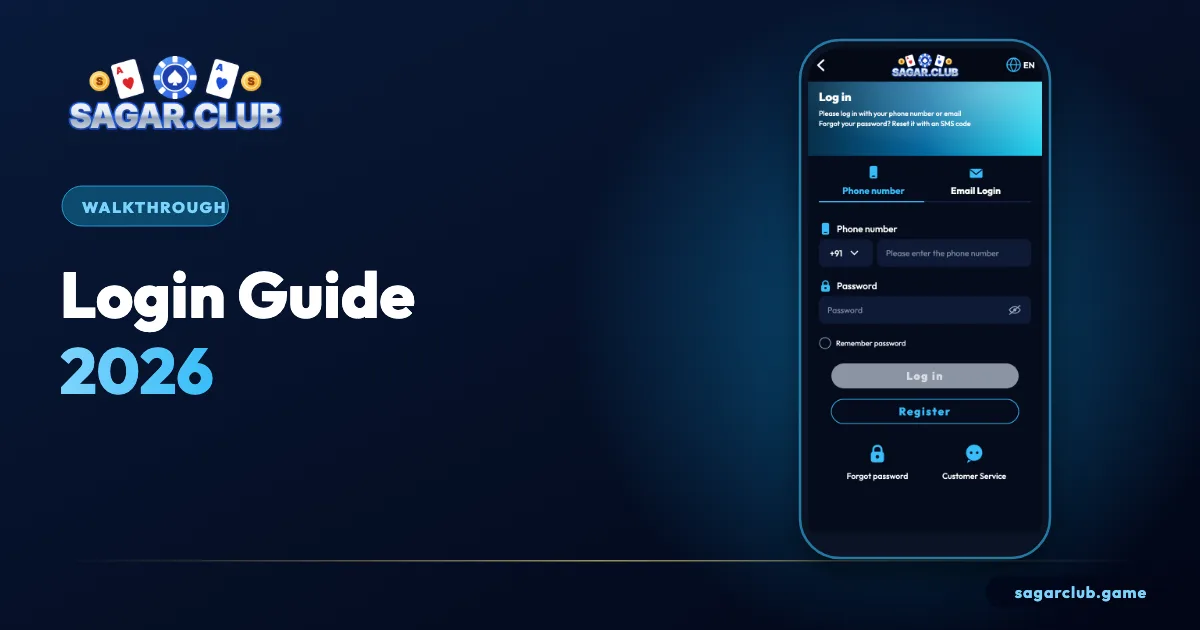
Open the Sagar Club app from your home screen. The login screen opens on the phone tab. Type your ten digits after +91 – no zero, no country code – then your password. Tap the eye icon if you’re unsure about a character, then Log in. If the app shows a white screen or spinner, switch between Wi-Fi and mobile data and make sure you have the latest version from the official site.
— IPHONE
On iPhone
The home-screen app.
Tap the Sagar Club icon you added from Safari. It opens full-screen like a normal app. If it keeps forgetting your login, the icon was probably added from a Private Browsing tab, or Safari is set to block all cookies. Remove the icon, open the official site in a normal Safari tab and add it again.
— LAPTOP
On a laptop
Any modern browser.
Open the official address from a bookmark. The site appears as a phone-shaped column. On a shared computer, use a private window, don’t save the password, and log out when you’re done.
— ERRORS
Five errors and their fixes
The usual suspects.
| Error | Fix |
|---|---|
| Account does not exist | Retype ten digits; try your other SIM |
| Incorrect password | Check capitals; reset after two tries |
| Too many attempts | Wait 30 minutes |
| Network error | Change network; VPN off |
| Session expired | Log in again |
— ROUTINE
A ten-second safety routine
Every time.
- Open from the app or a bookmark only.
- Check the address if using a browser.
- Never type your OTP for anyone.
- Log out on shared devices.
— AFTER LOGIN
After you’re in
Three quick checks.
Once you’re logged in, glance at the notice line for maintenance messages, confirm your nickname and UID at the top of the Account page, and check that login alerts are on. It takes ten seconds and catches most problems early.
— WHAT’S NEW
What changed in 2026
A smoother sign-in.
The 2026 version of the Sagar Club login screen keeps things simple: a phone tab selected by default, a password field with an eye icon, and links for registering and resetting just below the button. Email login sits on its own tab for accounts with a bound email. Login alerts and a device list in your profile make it easier to spot a sign-in you don’t recognise. None of this changes the basics – number plus password – but it does make problems quicker to diagnose.
If your screen looks different from the one in our guides, the most likely reason is an older app version. Update from the official site and check again.
— MORNING CHECK
A two-minute weekly login check
Small habit, big payoff.
Once a week, open your profile and look at the login security section. Are all the listed devices yours? Is your bound email still correct? Are alerts still on? It takes two minutes and catches problems long before they become serious. While you’re there, confirm you still remember your password without looking – if you don’t, save it properly in your phone’s password manager now rather than resetting in a hurry later.
— COMMON MYTHS
Login myths
Things that aren’t true.
‘You need an OTP every time you log in’ – no, only for registering and resetting. ‘Logging in at certain times gives better results’ – no, results are independent of when you log in. ‘Support can log in for you’ – no, and anyone offering to is a scammer. ‘A VPN makes your account safer’ – often it does the opposite by triggering security checks.
— RECAP
Login in 2026 – recap
Fast and safe.
In 2026, logging in to Sagar Club still comes down to your ten-digit number and your password, with no SMS code for a normal sign-in. Use the installed app on Android, the home-screen app on iPhone or a bookmark on a laptop. Read error messages carefully – they point straight to the fix – and reset after two failed attempts rather than guessing. Check your login devices and bound email once a week, keep alerts on, and ignore anyone who asks for a code or claims they can log in for you. With these habits, login takes seconds.
Open Sagar Club the right way
Use the official app or website – one Sagar Club account works on every device.
— FAQ
Frequently asked questions
Do I need an OTP for Sagar Club login?
No.
Why am I logged out on iPhone?
Private mode or blocked cookies.